Wake up PCs remotely
WakeMeOnLan is a free remote control program for PC devices made by NirSoft. This tool provides users with remote access capabilities to be able to reach a computer and wake them up. This can be done on more than one machine by sending a Wake-on-LAN(WOL) packet to them.
Top Recommended Alternative

What WakeMeOnLan does can be considered a combination of functions from Cisco Network Magic and Brutus. It allows for both turning on and off a PC, as well as being able to perform limited network diagnostics. This utility tool is portable and can be used on any computer.
How does WakeMeOnLan work?
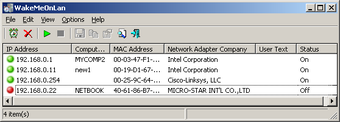
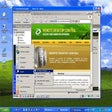
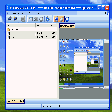
When you first start it up, it will automatically scan and detect all connected devices on a particular network, collects their network addresses, and saves them to a file. This list can be used to selectively turn on computers later on as needed. The user interface shows all machines and provides information about them, including local IP address, computer name, MAC address, and network adapter information & status.
You first need to enable the Wake On Lan feature via the network card properties. There are three ways to turn on computers. The first one is to select one and click on the "wake all selected computers" button. The second is via the right-click menu or by pressing the F8 key. The third can be done from your command line terminal using specific parameters.
Some things to take note of before you start using this program. First, there will be some instances where you need to enable the Wake On Lan feature from your BIOS settings first before doing it on your network properties. The second is that its features only work on wired connections, with all PCs connected to the same network. Its outdated UI design could use an overhaul, too.
A handy tool for network admins
If you work as a network administrator or you manage multiple PCs at once, WakeMeOnLan is a handy tool to have around at your disposal. It enables you to easily switch on or off any machine in your area, as well as collect network information on them for use later on. Plus, it's completely free to use. Recommended.